
Pocket Ninja Journal
How to Make a Word Search: 5 Steps, on Paper or Screen
· 8 min read
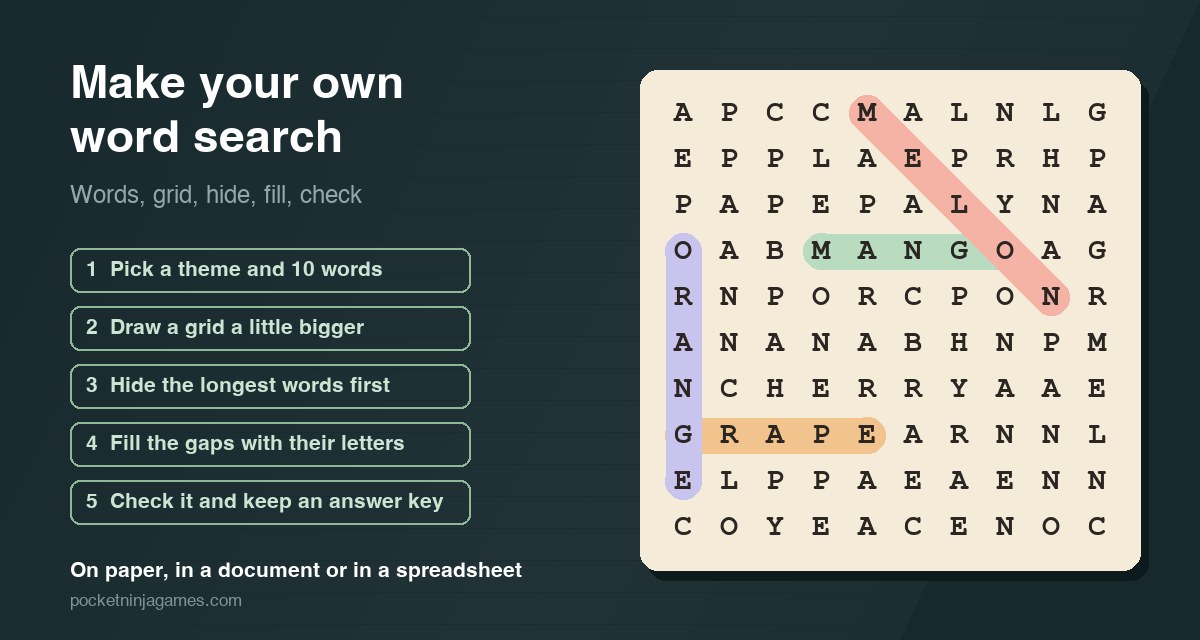
Short answer: pick a theme and about ten words, draw a grid two or three squares longer than your longest word, hide the longest words first in different directions, fill every empty square with letters taken from your own words, then find each word yourself and keep that copy as the answer key. Below is a worked 10×10 example, the right size for each age, and how to do it in Word, Google Docs, Excel or Sheets.
What you need
On paper: a pencil, an eraser and a ruler, or squared paper, which does the ruling for you. A 10×10 puzzle takes twenty to thirty minutes by hand the first time. On a computer, any word processor or spreadsheet will do; the section further down shows how.
The puzzle itself is simple: a square of letters with words hidden in straight lines, across, down, diagonally, and in harder puzzles backwards, plus the list of words to find. If you want to know more about where it comes from and how to solve one quickly, see what a word search is and how to solve it.
Five steps to make a word search
- Pick a theme and a word list. Choose a theme and write down about ten words for a 10×10 grid, fewer for young children. Use capitals, check the spelling, leave out spaces and hyphens (ICE CREAM becomes ICECREAM), and do not list a word that sits inside another one on the list, or it can be found twice.
- Choose the grid size. Make the grid at least two squares longer than your longest word, and draw it with a ruler or use squared paper. A 10×10 grid suits most children; teenagers and adults can take 15×15 or more.
- Hide the longest words first. Long words have the fewest places they can go, so place them while the grid is empty. Spread them out, mix the directions, and let words cross where they share a letter. Use a pencil: you will move one or two.
- Fill the gaps with letters from your words. Fill every empty square, but take the letters from your own words rather than the whole alphabet. A random Q or X stands out, while letters from the list make decoys: half a word, the start of another. Then read the rows for rude words you made by accident and change a letter.
- Check it and keep an answer key. On a copy, find and circle every word yourself. Each one should be there exactly once. Keep that copy as the answer key, and write the word list under the puzzle, in alphabetical order or by length.
Pick the size for whoever will solve it
The size of the grid, the number of words and the directions they run in decide how hard the puzzle is. These are starting points, not rules:
| Who | Grid | Words | Directions |
|---|---|---|---|
| Ages 4–6 | 6×6 | 5–6 short words | Across and down, with a picture next to each word |
| Ages 7–9 | 8×8 to 10×10 | 8–10 | Across, down and diagonal |
| Ages 10–12 | 12×12 | 12–15 | All of those, plus backwards |
| Teens and adults | 15×15 or more | 15–25 | All eight directions, with words crossing |
Backwards words make the biggest jump in difficulty, because readers look for the first letter and then read on to the right. Leave them out for anyone who is still learning to read.
A worked example: ten fruits in a 10×10 grid
The theme is fruit, and the list is APPLE, BANANA, CHERRY, GRAPE, LEMON, MANGO, MELON, ORANGE, PEACH, PEAR. The longest words, BANANA, CHERRY and ORANGE, have six letters, so a 10×10 grid gives each of them several places to go. The words run in four directions: across, down, diagonally down to the right, and backwards.
Every empty square was filled with a letter from the fruits themselves, which is why there are so many A, P, N and E. That is deliberate: PEA turns up four times, EAR and APE three times each and MAN twice, and the eye has to check every one of them. A grid filled from the whole alphabet would have Qs, Xs and Zs that the eye learns to skip. Each fruit appears exactly once, and the grid was read in all eight directions for words that should not be there.
| Word | Starts at | Direction |
|---|---|---|
| APPLE | row 9, column 5 | backwards |
| BANANA | row 6, column 6 | backwards |
| CHERRY | row 7, column 2 | across |
| GRAPE | row 8, column 1 | across |
| LEMON | row 2, column 4 | down |
| MANGO | row 4, column 4 | across |
| MELON | row 1, column 5 | diagonal, down to the right |
| ORANGE | row 4, column 1 | down |
| PEACH | row 2, column 3 | diagonal, down to the right |
| PEAR | row 8, column 4 | across |
Notice where words share letters. ORANGE runs down the left edge through BANANA, GRAPE and APPLE; LEMON runs down through PEACH, MANGO and BANANA; and in row 8, GRAPE and PEAR overlap on the same two letters, so the row reads GRAPEAR. Shared letters make a grid denser and harder, and they are also the easiest way to fit ten words into a hundred squares.
Make it easier or harder
- Easier: fewer and shorter words, bigger letters, only across and down, and a picture or the first letter next to each word on the list.
- Harder: backwards and diagonal words, more crossings, decoys such as MANG next to MANGO, and a bigger grid.
- Hardest: no word list at all, only the number of words, or a row of empty boxes for each word that shows how many letters it has.
- A secret message: once the words are placed, count the empty squares, write a sentence with exactly that many letters, and fill the squares with it in reading order. When every word is circled, the leftover letters read out the message.
How to make a word search on a computer
In Word or Google Docs
Insert a table with as many rows and columns as your grid, for example 10 by 10. Give every column the same width and every row the same height so the cells are square, centre the text, and choose a font whose letters are all the same width, such as Courier New, so the lines stay straight. Type one capital letter per cell. For the answer key, save a copy and shade the cells of each word.
In Excel or Google Sheets
Make the columns as wide as the rows are tall, and type the words in one letter per cell. To fill the empty cells, put all your words in one cell, say B1, as one long string, and type =MID($B$1, RANDBETWEEN(1, LEN($B$1)), 1) into an empty cell of the grid: it picks a random letter from your own words, which is step four done for you. Copy it into the other empty cells. The formula picks a new letter every time the sheet recalculates, so when you are happy, copy the grid and paste it back as values only.
Templates and generators
Design tools such as Canva have word search worksheet templates, and free word search generators build a grid from your list in seconds. Their grids are random, so do step five anyway: check that every word is there once and that the filler has not spelled something you would not hand to a class.
Ideas for a theme
- This week’s spelling list, or the words from a school topic: planets, the water cycle, the Romans.
- A birthday or a party, with the guests’ names hidden in the grid.
- A holiday, a trip, a season or a favourite book.
- Words in a language you are learning: finding them makes you look at every letter. More on that in word games for learning a language.
Rather solve one than make one?
We make Inkwell, a calm word search for iPhone that takes the hardest version from the list above: there is no word list, only empty slots that show how long each hidden word is. You press a letter and drag through the bubbles that touch it, diagonals included, so a word can turn corners. The letters you use drop into their slots and everything above falls into the gap. There is a daily board, an adventure of 600 levels across 12 worlds, and no clock.
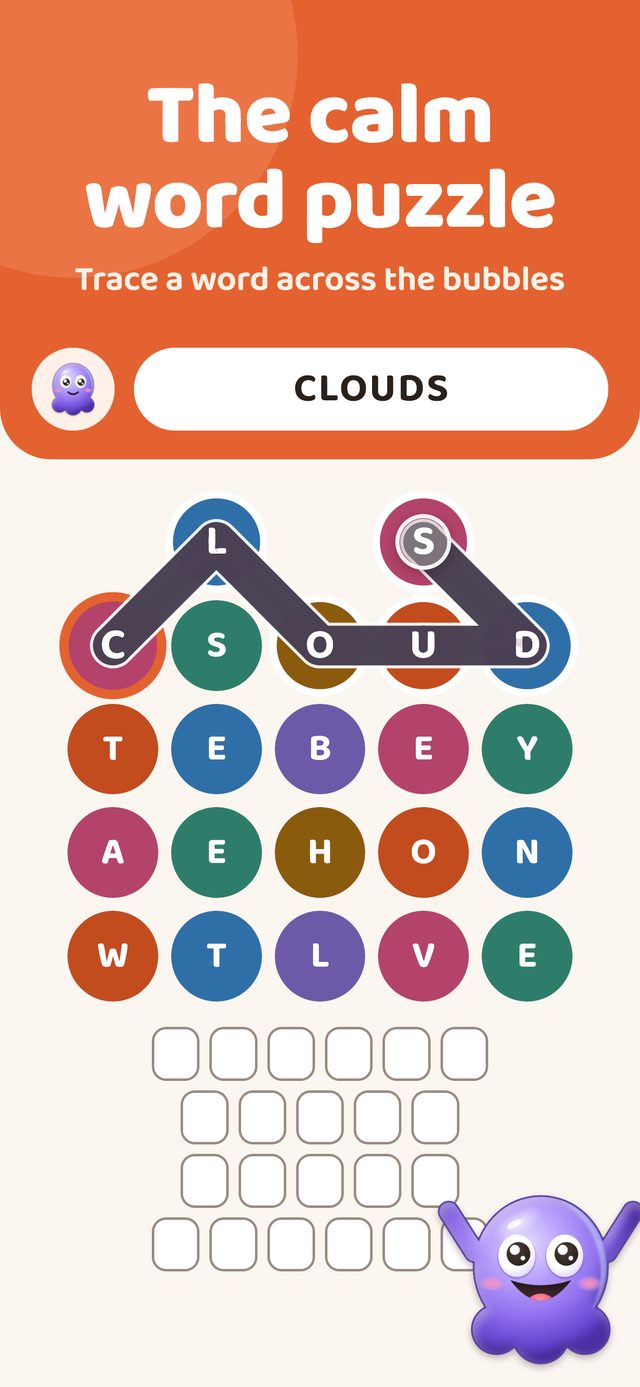
Inkwell Word Puzzle
A calm word search: find the hidden words in a stack of letter bubbles, with a daily board and no timer. Free on iPhone with ads, no account needed.

Frequently asked
How many words should a word search have?
A useful rule is about as many words as the grid has rows: ten words for a 10×10 grid, fifteen for 15×15. Young children do better with five to eight short words, and a grid packed with many more starts to read like noise.
What size should a word search grid be?
At least two squares longer than the longest word, so it can lie in more than one place. A 10×10 grid suits most children, 12×12 older ones, and 15×15 or larger works for teenagers and adults.
How do you make a word search harder?
Hide words backwards and diagonally, let more of them cross, fill the gaps with letters from the words themselves so that half-words act as decoys, use a bigger grid, or leave out the word list and give only the number of words.
Can words overlap in a word search?
Yes. Two words crossing on a shared letter is normal and makes the grid denser. What to avoid is one listed word sitting inside another, such as PEA inside PEACH, because then it can be found twice.
How do you make a word search in Word or Google Docs?
Insert a table with as many rows and columns as your grid, give every column the same width and every row the same height, centre the text and pick a font with letters of equal width such as Courier New. Type one capital per cell, then keep a copy with the words highlighted as the answer key.
What is a word search called in other languages?
In Spanish it is a sopa de letras, or pupiletras in Peru; in Brazilian Portuguese caça-palavras; in Italian crucipuzzle; in French mots mêlés; in German Wortsuche or Suchsel; in Dutch woordzoeker; and in Swedish ordsök.
More reading: word search explained · types of word games · word games for seniors.